




LED 디스플레이 시야거리란? 종합 가이드
LED 디스플레이 시야거리를 이해하여 적합한 LED 스크린을 선택하세요. 관련 요인과 계산 방법 등을 알아봅니다.

LED 디스플레이 구매를 고려할 때 가장 자주 드는 질문 중 하나는 “이 LED 디스플레이의 최적 시야거리는 얼마인가?”입니다. 많은 사용자는 편안하고 선명한 시각적 경험을 보장하는 최적의 시야거리를 결정하는 데 어려움과 혼란을 느낄 수 있습니다.
공백 화면, 왜곡된 디스플레이, 연결 문제 등 수신 카드의 상태와 기능을 이해하는 것이 중요합니다.
오늘은 LED 디스플레이 시야거리라는 주제에 대해 깊이 있게 다루고 실용적인 계산법을 공유하겠습니다.
본 글의 내용
- 시야거리란 무엇인가요?
- 시야거리의 중요성
- 시야거리에 영향을 미치는 요소
- 픽셀 피치와 시야거리
- 해상도와 시야거리
- 크기 및 시청 거리
- 실내 및 실외 디스플레이의 LED 시청 거리
- LED 디스플레이 시청 거리 계산법
- 실제 적용 시나리오 분석
- 결론
시야거리란 무엇인가요?
시청 거리는 시청자의 눈과 디스플레이 사이의 거리를 의미하며 LED 디스플레이. 개별 픽셀 구조를 인지하지 않고 콘텐츠를 선명하게 볼 수 있는 근접 거리를 나타냅니다. 적절한 시청 거리에서는 피로나 눈의 피로감 없이 선명한 영상을 즐길 수 있습니다.
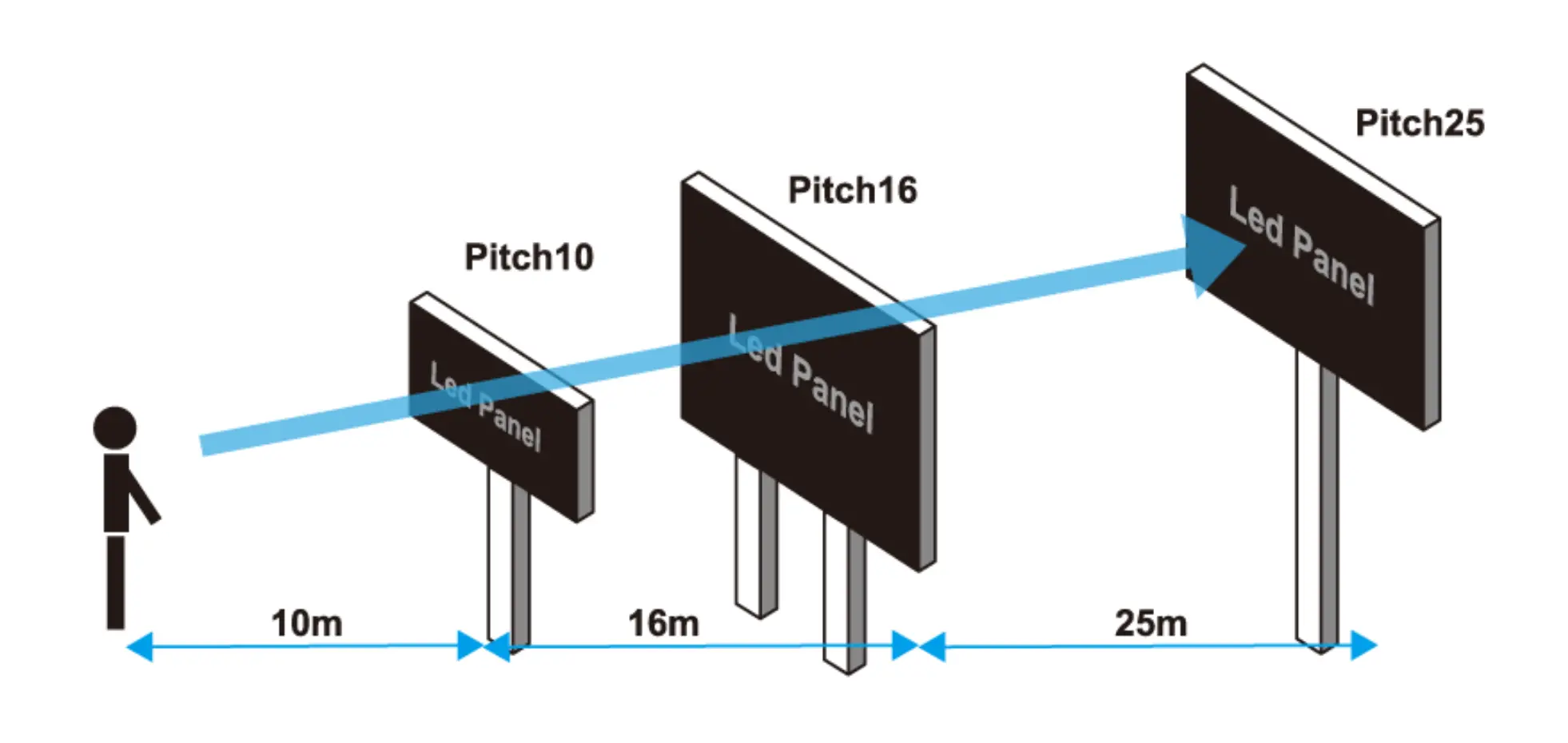
LED 디스플레이의 시청 거리를 논할 때 일반적으로 최소값이 설정됩니다. 이는 눈이 적응하여 이미지를 선명하게 볼 수 있는 가장 짧은 거리를 의미합니다. 이 지점 이후로는 화면의 콘텐츠를 볼 수 있는 한 무제한으로 멀리 이동할 수 있습니다.
마찬가지로 최대값도 설정되며, 이는 눈이 적응하여 이미지를 선명하게 볼 수 있는 가장 먼 거리를 의미합니다. 이 값을 초과하면 화면의 콘텐츠를 선명하게 볼 수 없게 될 수 있습니다.
시야거리의 중요성
LED 시청 거리를 이해하면 필요에 맞는 올바른 LED 디스플레이를 선택하는 데 도움이 됩니다. 다음과 같은 최적의 디스플레이 성능을 분석하고 결정하는 데 도움이 될 수 있습니다:
- 적절한 화면 크기 선택
- LED 디스플레이의 이상적인 픽셀 피치 선택
- LED 디스플레이의 최적 설치 높이 추정
- 시청자에게 완벽한 시각적 경험 제공
LED 시청 거리를 더 잘 이해하려면 다른 요소들과의 관계를 학습하고 인식할 수 있어야 합니다.
시야거리에 영향을 미치는 요소
LED 시청 거리를 이해하는 것은 요구 사항에 맞는 올바른 LED 디스플레이를 선택하는 데 도움이 됩니다. 이는 최적의 디스플레이 파라미터를 분석하고 결정하는 데 도움을 줄 수 있습니다. 예를 들어:
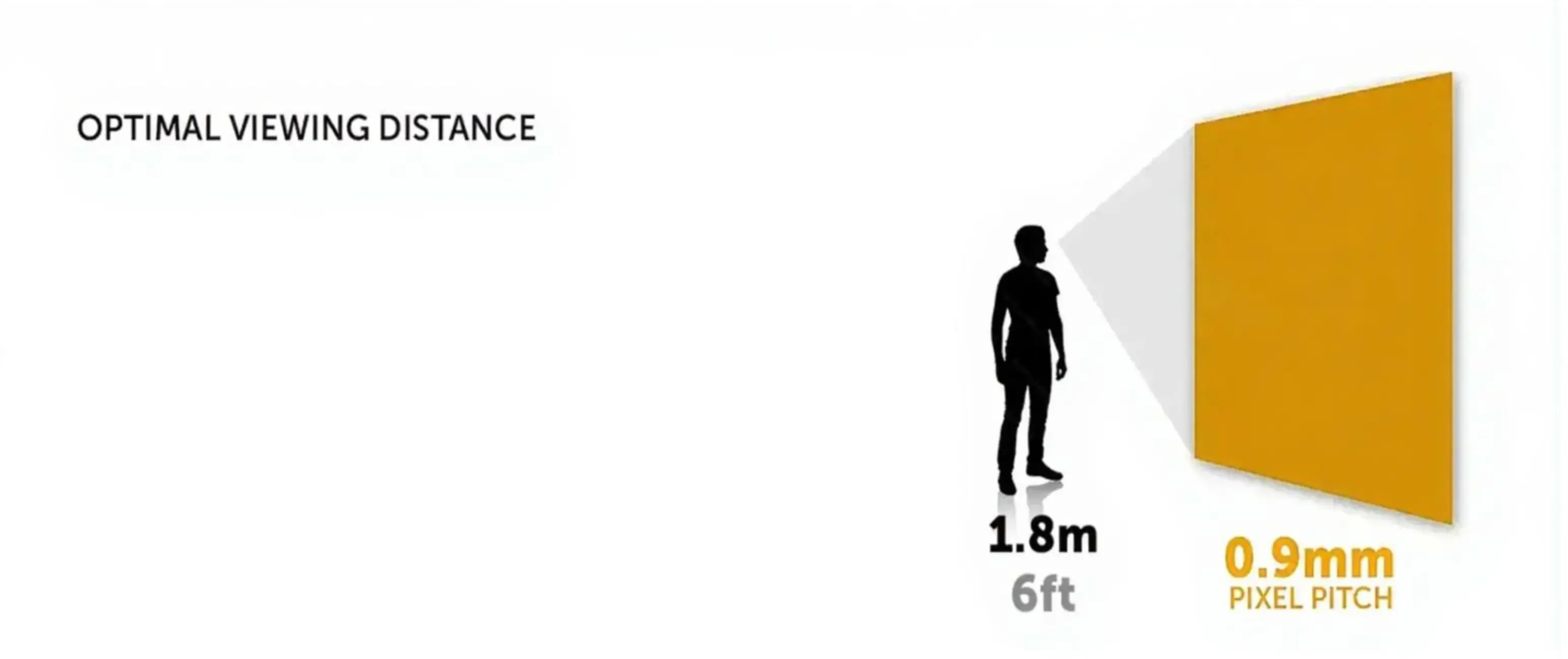
- 픽셀 피치: 이는 화면의 픽셀 밀도를 직접 결정합니다. 픽셀 피치가 작을수록 최소 시청 거리가 짧아져 디스플레이를 더 가까운 거리에서 볼 수 있습니다.
- 해상도: 해상도가 높을수록 이미지 디테일이 풍부해져 더 가까운 거리에서 시청할 수 있습니다.
- 크기: LED 디스플레이의 크기는 시청 거리에 영향을 미칩니다. 큰 LED 화면은 더 긴 시청 거리가 필요하며, 작은 LED 화면은 더 짧은 시청 거리가 필요합니다.
픽셀 피치와 시야거리
픽셀 피치는 LED 디스플레이에서 서로 인접한 두 픽셀 사이의 거리를 나타내며, 보통 숫자 뒤에 “P'가 붙은 형태로 표시됩니다. 예를 들어 P4는 픽셀 피치가 4밀리미터임을 의미합니다.
픽셀 피치는 LED 시청 거리에 직접적인 영향을 미칩니다. 픽셀 피치가 클수록 최소 시청 거리가 길어져 디스플레이를 편안하게 보려면 충분한 거리를 유지해야 합니다. 픽셀 피치를 선택할 때 디스플레이의 설치 위치와 시청 객과의 거리를 고려하여 왜곡 없이 완벽한 시각적 경험을 제공하도록 해야 합니다.
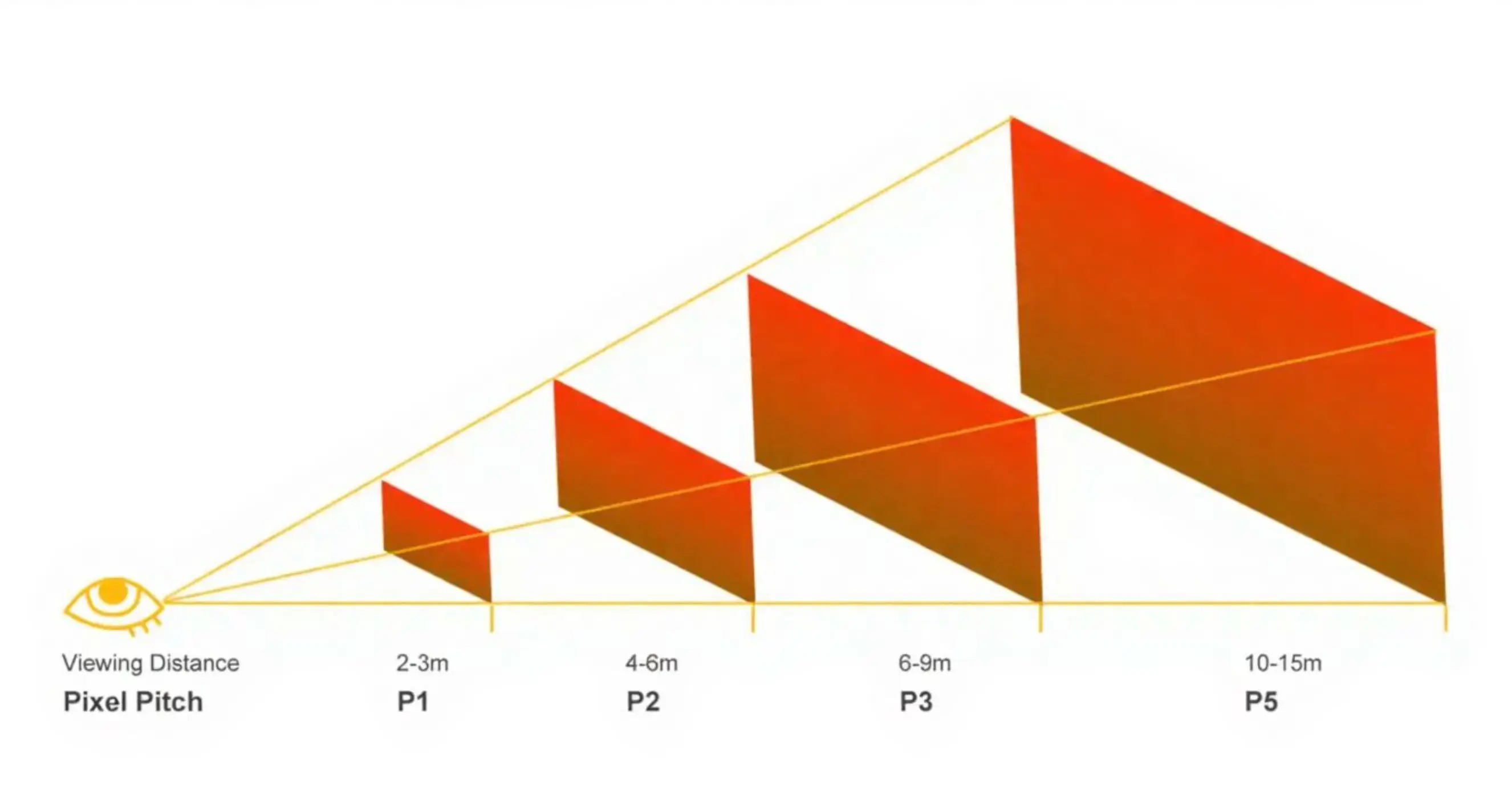
The relationship between pixel pitch and viewing distance can be approximated using the following formulas:
- Minimum viewing distance = Pixel pitch x 1000
- Optimal viewing distance = Pixel pitch x 2000 ~ Pixel pitch x 3000
- Maximum viewing distance = Pixel pitch x 30000
For example, if you have a P3 LED display, the optimal viewing distance is approximately 3 to 9 meters. This means that within this distance range, you can obtain a clear image and a comfortable visual experience. Conversely, if the minimum distance from the installation location to the viewing audience is about 5 meters, you should choose a pixel pitch of P5 or smaller, such as P4, P3, etc.
Here is a summary table for your reference, showing various pixel pitches and their suitable viewing distances:
시야거리를 위한 픽셀 피치
| 픽셀 피치 | 최소 시청 거리 | 최적 시청 거리 | 최대 시야 거리 |
| P1.25 mm | 1.25 m (4.1ft) | 2.5 ~ 3.75 m (8.2ft ~ 12.3ft) | 38m (127.4 ft) |
| P1.5 mm | 1.5 m (4.9ft) | 3 ~ 4.5 m (9.8ft ~ 14.8ft) | 45m (147.6 ft) |
| P1.86 mm | 1.86m (6.1ft) | 3.7m ~ 5.6m (12.1ft ~ 18.4ft) | 56m (183.7ft) |
| P2mm | 2m (6.6ft) | 4m ~ 6m (13.1ft ~ 19.7ft) | 60m (196.9ft) |
| P2.5mm | 2.5m (8.2ft) | 5m ~ 7.5m (16.4ft ~ 24.6ft) | 75m (246.1 ft) |
| P3 mm | 3 m (9.8ft) | 6~9 m (19.7ft~29.5ft) | 90m (295.3 ft) |
| P3.91 mm | 3.91 m (13ft) | 7.8~11.7 m (19.5ft~29.1ft) | 117m (291 ft) |
| P4 mm | 4 m (13.1ft) | 8~12 m (26.2ft~39.4ft) | 120m (393.7 ft) |
| P5 mm | 5 m (16.4ft) | 10~15 m (32.8ft~49.2ft) | 150m (492.1 ft) |
| P6 mm | 6 m (19.7ft) | 12~18 m (39.4ft~59.1ft) | 180m (590.6 ft) |
| P8 mm | 8 m (26.2ft) | 16~24 m (52.5ft~78.7ft) | 240m (787.4 ft) |
| P10 mm | 10 m (32.8ft) | 20~30 m (65.6ft~98.4ft) | 300m (984.1 ft) |
| P16 mm | 16 m (52.5피트) | 32~48 m (105피트~157.5피트) | 480m (1574.8 피트) |
| P20 mm | 20 m (65.6피트) | 40~60 m (131피트~197피트) | 600m (1969 피트) |
As shown in the table, pixel pitch usually represents the minimum viewing distance, such as P3, with a minimum viewing distance of 3 meters, and P10, with a minimum viewing distance of 10 meters.
해상도와 시야거리
Resolution is typically determined by pixel pitch. Therefore, lower resolution means larger pixel pitch, resulting in a greater minimum viewing distance.
For instance, a display with a 1K resolution has a higher minimum viewing distance compared to a display with a 2K resolution. Similarly, a display with a 4K resolution has a higher minimum viewing distance compared to a display with an 8K resolution, and so on.
크기 및 시청 거리
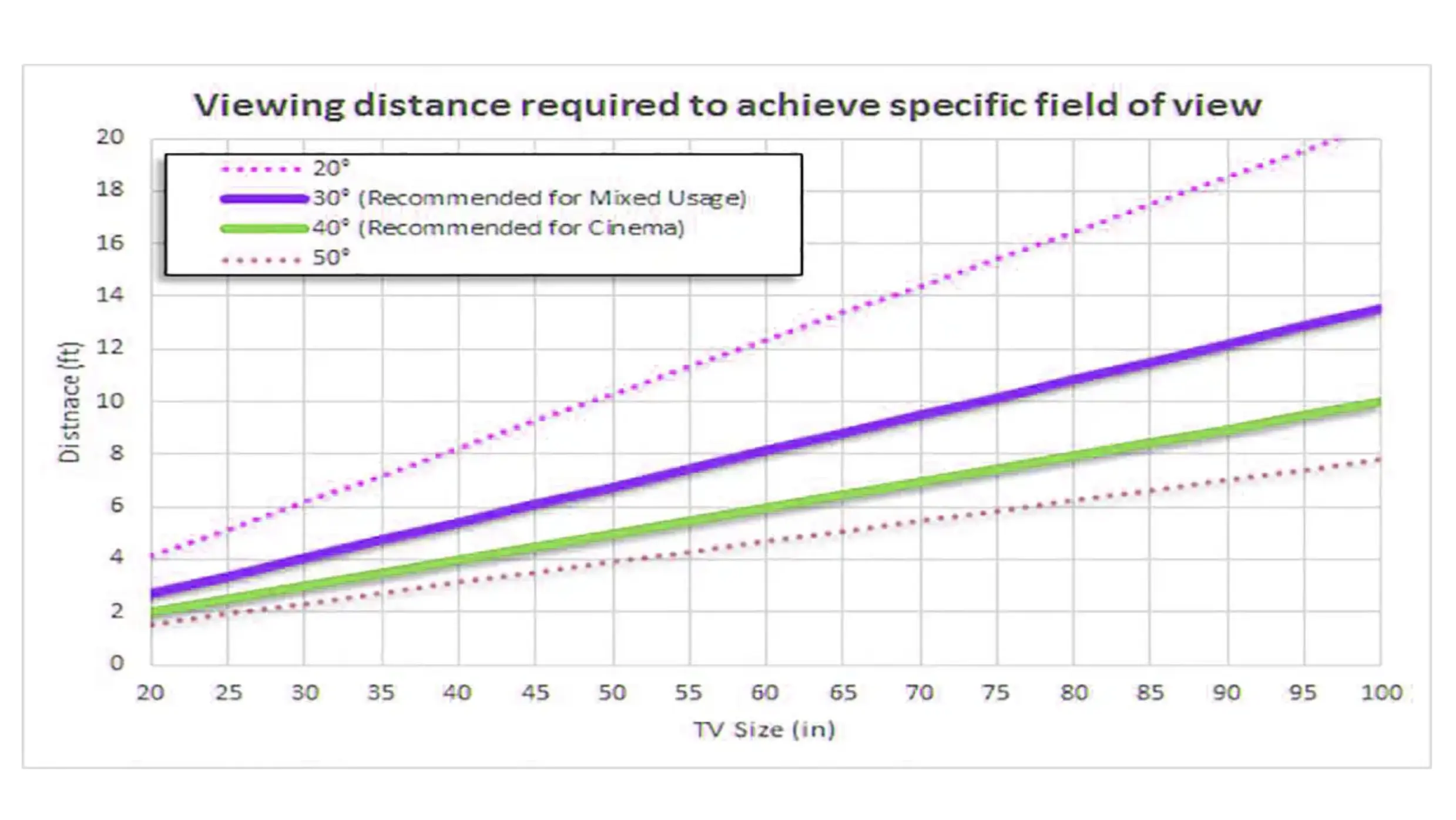
A screen’s physical size also influences how far viewers should be positioned:
- Smaller Screens: Closer viewing distance
- Larger Screens: Requires further viewing distance
실내 및 실외 디스플레이의 LED 시청 거리
Outdoor and indoor screens differ significantly due to their viewing environments. Outdoor screens typically have a larger pixel pitch due to the greater average viewing distance, often necessitated by broader audience fields.
Conversely, indoor screens benefit from smaller pitches since viewers are usually closer, needing finer detail and higher resolution for clear imaging.
LED 디스플레이 시청 거리 계산법
As mentioned above, pixel pitch has a direct impact on the viewing distance of a display. To estimate the LED viewing distance of a display, the first thing you need to do is understand the pixel pitch. Once you have the pixel pitch of your display, you can follow these steps to estimate the viewing distance:
A simple and practical formula: LED viewing distance = (LED pixel pitch x 1000) to (LED pixel pitch x 3000) (unit: millimeters).
- Convert the pixel pitch from millimeters to meters (e.g., P2, i.e., 2mm converted to 2m).
- Multiply the result by 2 – this is the minimum optimal LED viewing distance (2m x 2 = 4 meters).
- Multiply the result by 3 – this is the maximum viewing distance of the LED display (2 x 3 = 6 meters).
- If you want the viewing distance in feet, multiply the result by 3. For example, the minimum viewing distance for P2 is 4 x 3 = 6 feet, and the maximum viewing distance is 6 x 3 = 18 feet.
실제 적용 시나리오 분석
- Conference Rooms and Training Venues: P1.2-P2 LED screens are suitable for medium-sized conference rooms, with a viewing distance of about 1.2 to 2 meters, ensuring clarity and facilitating interactive communication.
- Control Rooms and Command Centers: P0.9-P0.7 level screens require extremely high precision, with a viewing distance of less than 1 meter, ensuring operators can accurately identify every detail on the screen.
- Retail and Exhibition Displays: P2.0-P2 is suitable for large exhibition spaces, with a viewing distance of 1 to 2 meters, meeting both distant attraction and close-up needs.
- Indoor Stores and Stages: P2.5-P5 is suitable for large spaces, with a viewing distance of 2.5 to 5 meters, meeting both distant attraction and close-up needs.
- Outdoor Billboards: For open and distant installation locations, use P6, P8, P10, etc., with a viewing distance of over 6 meters, meeting distant attraction needs.
- Theaters and Studios: Ultra-high-definition displays below P1.5, with audience seating distances typically over 4 meters, but front-row viewers may need smaller pixel pitch screens for the best experience.
결론
To achieve the best viewing experience, it is recommended to consider factors such as pixel pitch, resolution, size, and ambient lighting conditions when calculating the viewing distance of an LED display. You can also use relevant formulas for estimation and make adjustments to ensure a comfortable viewing experience.
Additionally, you can refer to pixel pitch and viewing distance tables to quickly analyze the appropriate pixel pitch (based on the determined display and viewing distance) or approximate installation distance (based on the determined pixel pitch). For further assistance with the viewing distance, consider contacting us.
For close-viewing installations, compare the conference room display solution with the Mi-Pro Series pixel-pitch options.
관련 기사


